FPGA PCIe P2P Communication: Implementing GPU Direct RDMA
Xingce Electronics' FPGA PCIe devices fully support GPU DIRECT DMA, enabling P2P (Peer-to-Peer) data transfer from FPGA cache to GPU memory bypassing the CPU. This significantly improves system performance, reduces transmission latency, and is suitable for latency-sensitive scenarios such as quantum computing and semiconductor testing.
This article focuses on P2P transmission between FPGA and GPU, and does not cover P2P between FPGAs or between GPUs. Stay tuned for more content.
1. Solution Overview
1.1 What is GPU Direct RDMA
GPU Direct RDMA allows FPGAs to bypass the CPU and system memory and directly exchange data with GPU video memory via the PCIe bus.
Traditional Path:  FPGA ──DMA──> CPU Memory ──cudaMemcpy──> GPU Memory  (2 copies)
GPU Direct: FPGA ──PCIe DMA──> GPU Memory                        (1 copy, zero CPU involvement)

1.2 Core Value
| Value |
Effect |
| Latency Reduction ~50% |
Eliminates CPU intermediate copy, cutting end-to-end latency in half |
| Bandwidth Improvement 1.5x~3.2x |
Direct data transfer to GPU without system memory bus contention |
| Complete CPU Offloading |
Zero CPU overhead during DMA transfer, freeing CPU for inference/control tasks |
1.3 Application Scenarios
| Scenario |
Recommended Solution |
Expected Benefit |
| FPGA Image Acquisition → GPU Inference |
GPU Direct (Multi-buffer Rotation) |
2.0x Acceleration |
| FPGA Signal Processing → GPU Computing |
GPU Direct (Single Buffer) |
1.5x~2.0x Acceleration |
| FPGA ↔ CPU Data Exchange |
Traditional CPU DMA |
No Switch Required |
2. Validation Platforms
2.1 Hardware and Software Environment
Comprehensive validation has been completed on three major platforms, covering embedded, server, and workstation application scenarios:
| |
Tegra (Jetson Orin) |
Desktop (H100) |
Desktop (RTX A4000) |
| Positioning |
Embedded Edge Computing |
High-Performance Server |
General Workstation |
| CPU |
ARM Cortex-A78AE |
Intel Xeon 8462Y+ |
Intel Core (x86) |
| GPU |
Integrated Ampere GPU |
H100 PCIe (80GB HBM2e) |
RTX A4000 (16GB GDDR6) |
| FPGA PCIe |
Gen3 x4 |
Gen3 x8 |
Gen3 x4 (Limited by Motherboard Slot) |
| FPGA-side Memory |
DDR4 2GB |
DDR4 2GB |
DDR4 2GB |
| OS |
Ubuntu 22.04 (aarch64) |
Ubuntu 22.04 (x86_64) |
Ubuntu 18.04 (x86_64) |
| CUDA |
12.6 |
12.4 |
9.1 |
| glibc |
2.35 |
2.35 |
2.27 |
Compatibility Highlight: The three platforms span aarch64 / x86_64 architectures, CUDA 9.1~12.6 versions, and Ubuntu 18.04~22.04 OS releases, representing industry-leading validation coverage (first in China).
The Jetson platform uses Xingce Electronics' JetKU board [JetKU, Jetson Orin + KU5P FPGA, Gen3x4]

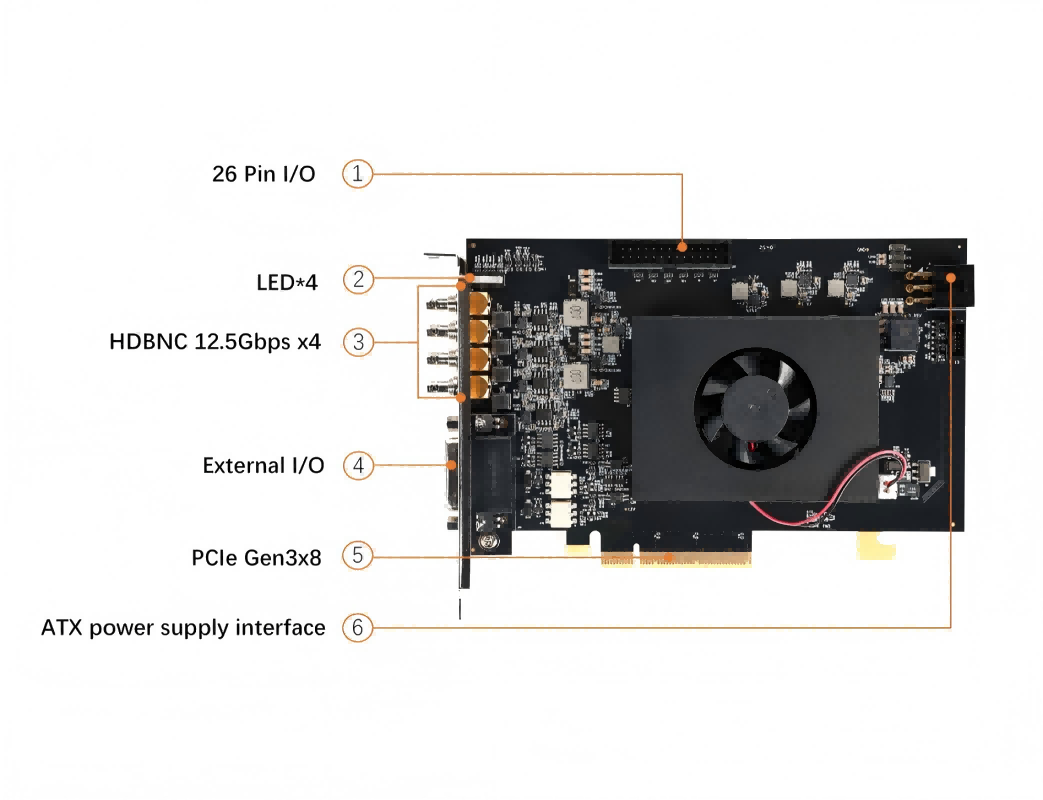
The X86 platform uses Xingce Electronics' PCIe1004 board [PCIe1004, KU040 FPGA + CXP Acquisition, Gen3x8]
2.2 Driver Architecture
User Space:  libHelloFPGACore.so (TransferMode API)
               │
               ├─ CPU Mode:  open → read/write (Traditional Path)
               └─ GPU Direct: open → ioctl (Pin/Xfer/Unpin)
                                    │
Kernel Space:  HelloFPGA.ko (XDMA + GPU Direct Extension)
                                    │
Hardware:  Xilinx FPGA XDMA IP ←──PCIe DMA──> GPU BAR (Physical Address Direct Access)
Some customers have actually used the PCIe AXI Bridge IP, which is more compatible with P2P and is also a good alternative.
3. Test Results
Test Program: gpu_direct_api_test.cu, supporting Quick Test (~2 minutes) and 12-hour Long-term Stability Test modes.
3.1 Functional Validation: 15/15 Passed on All Three Platforms
12-hour continuous testing was completed on 2 platforms with no significant performance degradation and throughput fluctuation within 5%.
| Test Item |
Tegra (Orin) |
H100 |
RTX A4000 |
| GetStatus Platform Identification |
✅ |
✅ |
✅ |
| Pin GPU Memory |
✅ |
✅ |
✅ |
| ReadC2H (FPGA→GPU) |
✅ |
✅ |
✅ |
| WriteH2C (GPU→FPGA) |
✅ |
✅ |
✅ |
| Unpin Release |
✅ |
✅ |
✅ |
| Data Correctness (Byte-by-Byte Comparison) |
✅ |
✅ |
✅ |
| Batch Mode 10×ReadC2H |
✅ |
✅ |
✅ |
| 2GB Address Space (7 Points) |
✅ |
✅ |
✅ |
| 2GB Stress Test (6 Offsets) |
✅ |
✅ |
✅ |
| 2GB Boundary Test (6 Points) |
✅ |
✅ |
✅ |
A total of 15 test cases were executed with 100% pass rate across all three platforms, fully validating functional reliability.
3.2 Performance Highlights
3.2.1 Peak Bandwidth
Note: For the RTX A4000 test environment, the speed is limited to Gen3x4 due to motherboard slot constraints.
| Platform |
PCIe Link |
GPU Direct Peak Bandwidth |
Theoretical Limit |
Utilization Rate |
| Tegra (Orin) |
Gen3 x4 |
2.84 GB/s |
~3.94 GB/s |
72% |
| H100 |
Gen3 x8 |
7.37 GB/s |
~7.88 GB/s |
93.5% |
| RTX A4000 |
Gen3 x4 |
3.51 GB/s |
~3.94 GB/s |
89% |
The H100 platform achieves 93.5% of the theoretical PCIe Gen3 x8 bandwidth limit with GPU Direct, and the RTX A4000 reaches 89% of Gen3 x4 limit, representing industry-leading transmission efficiency.
3.2.2 Acceleration Ratio (vs Traditional FPGA→CPU→GPU Path)
| Platform |
Read Acceleration |
Write Acceleration |
Test Conditions |
| Tegra (Orin) |
1.97x |
2.49x |
4MB Block, 12h Average |
| H100 |
2.78x |
3.17x |
4MB Block, 12h Average |
| RTX A4000 |
1.40x |
1.44x |
8MB Block, Single Test |
The main benefit of GPU Direct over the traditional path comes from eliminating the cudaMemcpy intermediate copy, resulting in acceleration ratios ranging from 1.4x to 3.2x.
3.2.3 Multi-Size Performance (RTX A4000 Example)
| Data Size |
GPU Direct Read |
GPU Direct Write |
Acceleration Ratio (vs Full Path) |
| 4KB |
41.2 μs |
19.8 μs |
1.32x / 2.81x |
| 64KB |
30.2 μs |
39.8 μs |
1.60x / 1.49x |
| 1MB |
318.6 μs |
336.6 μs |
1.43x / 1.50x |
| 4MB |
1219.4 μs |
1236.0 μs |
1.40x / 1.44x |
| 8MB |
2390.6 μs |
2430.8 μs |
1.42x / 1.44x |
GPU Direct outperforms the traditional path starting from 64KB, maintaining a stable 1.4x acceleration ratio for large block sizes. Data for Tegra and H100 platforms are available in the appendix.
3.2.4 Equivalent Frame Rate (1MB / Frame)
| Platform |
Multi-Buffer Frame Rate |
Single-Buffer Frame Rate |
Difference |
| Tegra (Orin) |
1993 fps |
2033 fps |
0.98x |
| H100 |
6661 fps |
6658 fps |
1.00x |
| RTX A4000 |
3136 fps |
3127 fps |
1.00x |
No performance loss with multi-buffer rotation - 4-frame rotation achieves identical performance to single-frame transfer, perfectly suited for image acquisition pipeline scenarios.
3.3 TransferMode: Zero-Code Modification Upgrade
Users only need to add 2 lines of configuration code to automatically switch existing HelloFPGA_DMA_MM_* calls to the GPU Direct path:
HelloFPGA_SetGPUBuffer(hDev, gpuAddr, size);                    // Added: Register GPU Buffer
HelloFPGA_SetTransferMode(hDev, HELLOFPGA_XFER_MODE_GPU_PINNED); // Added: Switch Mode
HelloFPGA_DMA_MM_ReadC2H(hDev, ch, buf, offset, len, &actual);   // Existing code unchanged!
TransferMode Acceleration Ratio (Three Platform Comparison)
| Data Size |
Tegra (Wr/Rd) |
H100 (Wr/Rd) |
RTX A4000 (Wr/Rd) |
| 4KB |
1.26x / 1.38x |
1.08x / 1.25x |
1.93x / 1.85x |
| 1MB |
1.39x / 1.45x |
1.10x / 1.14x |
1.14x / 1.12x |
| 4MB |
1.41x / 1.46x |
1.11x / 1.15x |
1.07x / 1.09x |
The RTX A4000 achieves a remarkable 1.93x acceleration ratio for 4KB small blocks. The H100 shows only ~1.1x acceleration because CPU DMA already approaches peak performance with Gen3 x8 bandwidth.
3.4 12-Hour Long-Term Stability Test
Tegra Platform (4MB, 72 Samples)
| Metric |
Read |
Write |
| Average Latency |
1785.1 μs |
1489.0 μs |
| Average Bandwidth |
2.35 GB/s |
2.82 GB/s |
| 0~4h → 8~12h Drift |
< 0.3% |
< 0.3% |
| Power Consumption |
18.2~18.9W (Stable) |
No Thermal Throttling |
H100 Platform (4MB, 72 Samples)
| Metric |
Read |
Write |
| Average Latency |
601.0 μs |
620.4 μs |
| Average Bandwidth |
6.98 GB/s |
6.76 GB/s |
| 0~4h → 8~12h Drift |
< 0.4% |
< 0.4% |
Continuous 12-hour operation with no performance degradation on both platforms, demonstrating production-grade stability of the GPU Direct solution.
3.5 Three Platform Comparison Overview
| Metric |
Tegra (Orin) |
H100 |
RTX A4000 |
| PCIe Link |
Gen3 x4 |
Gen3 x8 |
Gen3 x4 |
| Peak Bandwidth |
2.84 GB/s |
7.37 GB/s |
3.51 GB/s |
| 1MB Read |
521.2 μs |
152.2 μs |
318.6 μs |
| 1MB Write |
412.6 μs |
159.2 μs |
336.6 μs |
| Frame Rate (1MB) |
1993 fps |
6661 fps |
3136 fps |
| 12h Stability |
✅ No Degradation |
✅ No Degradation |
— |
| 2GB Address Coverage |
✅ |
✅ |
✅ |
| Data Correctness |
✅ |
✅ |
✅ |
| OS / CUDA |
Ubuntu 22.04 / 12.6 |
Ubuntu 22.04 / 12.4 |
Ubuntu 18.04 / 9.1 |
PCIe Link Difference Explanation: Tegra and RTX A4000 are both limited to Gen3 x4 by carrier board/motherboard slot constraints, resulting in similar peak bandwidth levels. The H100 server platform provides Gen3 x8 slots, delivering approximately twice the bandwidth of the other two platforms.
4. Integration Guide
4.1 Four-Step Integration of GPU Direct
// 1. Allocate GPU Buffer
cudaMalloc(&gpuBuf, size);

// 2. Pin Lock (Only once during initialization)
HelloFPGA_GPUDirect_Pin(hDev, gpuBuf, size, &handle);

// 3. DMA Transfer (Reuse handle indefinitely)
HelloFPGA_GPUDirect_ReadC2H(hDev, ch, handle, fpgaAddr, size, timeout);
HelloFPGA_GPUDirect_WriteH2C(hDev, ch, handle, fpgaAddr, size, timeout);

// 4. Release (On program exit)
HelloFPGA_GPUDirect_Unpin(hDev, handle);
4.2 Key Constraints
| Constraint |
Explanation |
| 4K Alignment |
GPU buffer address and size must be 4096-byte aligned |
| Pin Only Once |
Pin during initialization and reuse handle; avoid frequent Pin/Unpin in loops |
| Minimum Transfer Block ≥ 64KB |
DMA setup overhead dominates for small blocks (<4KB), limiting performance benefits |
| Root Privileges Required |
GPU Direct ioctl requires privileged access to device files |
4.3 Automatic Platform Adaptation
The API automatically detects platform type (Tegra / Desktop) - no conditional compilation required in user code:
HelloFPGA_GetGPUStatus(&status);
// status.platform: 1 = Tegra (cudaHostAlloc), 2 = Desktop (cudaMalloc)
// status.supported: 1 = GPU Direct Available
5. Summary
Core Advantages of HelloFPGA GPU Direct RDMA Solution:
| Advantage |
Data Support |
| High Performance |
H100 peak 7.37 GB/s (93.5% of PCIe limit), frame rate 6600+ fps |
| High Reliability |
15/15 test cases passed across three platforms, 12-hour stable operation with no degradation |
| Broad Compatibility |
aarch64 + x86_64 / CUDA 9.1~12.6 / Ubuntu 18.04~22.04 |
| Zero Modification |
TransferMode enables automatic acceleration with just 2 lines of code (no changes to legacy interfaces) |
| Production-Grade |
Multi-buffer support, multi-device compatibility, process mutual exclusion, error recovery |
Reference:
https://docs.nvidia.com/cuda/gpudirect-rdma/index.html