


PCIe-2005 4-Channel CoaXPress Over Fiber Grabber
●QSFP+ 40G optical interface, supports CXP & GenICam
●Onboard Xilinx Kintex UltraScale+ FPGA + 8 GB DDR4 SDRAM
●Widely used in fields such as semiconductor inspection, flat panel display inspection, high-speed scientific imaging, intelligent transportation, and medical imaging
PCIe-2005 4-Channel CoaXPress-over-Fiber Camera Simulator
40G Aggregate Bandwidth · High-Performance CoF Camera Simulation Platform
High-performance CoaXPress-over-Fiber Camera Simulation and System Test Platform
Documents Download
PCIe-2005 4-Channel CoaXPress Over Fiber 10G Camera Simulator User Manual.pdf
Specifications

Four Core Advantages
High-Fidelity Camera Simulation
Fully replicates the CoF camera communication mechanism, image streaming and control logic. System-level verification can be performed without connecting a physical camera.
Flexible Image Source Configuration
Supports multiple built-in / external image sources. Resolution, pixel formats (Mono/Bayer/RGB/YUV/YCbCr/RGBA) and line/field timing parameters can be flexibly configured.
Rich Trigger & I/O Simulation
Supports multiple trigger modes, 2 quadrature encoders (forward/reverse counting, position trigger, noise filtering), and 2 general-purpose timers with configurable delay. It accurately simulates the behavior of real industrial cameras in complex production environments.
Protocol Compliance & Stress Testing
Configurable transmission rate, resolution, frame rate, and error packet injection for verifying the protocol compliance and high-load robustness of receiver devices.
Product Overview
- PCIe-2005 is a high-performance multi-channel 40G CoaXPress-over-Fiber (CoF) camera simulator, a high-performance development and test tool designed to emulate the operating behavior of CoF interface cameras.
- Without a physical camera, it fully reproduces the communication mechanism, image streaming and control logic of CoF cameras in vision systems. This improves the efficiency and reliability of image acquisition workflow verification, driver development, application integration and system-level validation.
- Strictly compliant with CoaXPress 2.0 specification to guarantee compatibility with mainstream frame grabbers and vision software ecosystems. Supports multiple built-in or external image sources with flexible configuration of output resolution, pixel formats and timing parameters.
- Equipped with Xilinx XCKU5P-2FVB676-I FPGA and 8GB DDR4 SDRAM. Supports CXP-12×4 mode (up to 50Gbps bandwidth) and PoCXP power protocol.
- Widely used for aerospace camera ground testing, hardware-in-the-loop simulation of vision systems, protocol conformance and stress testing, fault reproduction and remote technical support.
Key Features
- 4 × 10G fiber receive channels (QSFP+ interface), supports CXP-12×4 mode
- Supports CoaXPress v2.0 over Fiber (CXP-12×4 over QSFP+) protocol standard
- Supports CoaXPress over Fiber Bridge Protocol standard
- PCIe Gen3 x8 high-speed host interface, backward compatible with Gen2/Gen1 (1/2/4-channel downgrade; 8.0 GT/s PCIe 3.0 / 5.0 GT/s PCIe 2.0)
- Xilinx XCKU5P-2FVB676-I FPGA, user custom logic development supported
- 8GB DDR4 SDRAM for frame buffering and intermediate data processing
- 4 bi-color status LEDs compliant with CoaXPress Link Status standard (Link Up/Down, Error)
- PoCXP power delivery: 17W @ 24V DC regulated power per CoaXPress connector, with device detection, auto power-up, overload and short-circuit protection
- Rich I/O configuration: 4 differential LINE0-3 (RS-485/422), 2 opto-isolated inputs, 2 opto-isolated outputs, 1 LVDS I/O, 2 LVTTL GPIO
- 2 quadrature encoders (A/B/Z input, 32-bit position counter, forward/reverse counting, position trigger, noise filtering), 2 general-purpose timers (configurable delay, 32-bit accumulator)
- GenTL Producer (.cti+.dll/.so) and Aravis SDK supported, fully GenICam compliant, with ImgGrab GUI tool provided
- Standard 3U half-length PCIe card (167.65mm × 111.15mm × 23mm), fan-cooled design
- Supports area-scan and line-scan camera simulation
- Supported pixel formats: Mono8/10/12/14/16, BayerXX8/10/12/14/16 (GR/RG/GB/BG), RGB, YUV, YCbCr, RGBA
- Polarity control: software-selectable inversion of input and output signal polarity
Technical Specifications
| Item | Specification |
|---|---|
| Interface Standard |
CoaXPress v2.0 over Fiber (CXP-12×4 over QSFP+) |
|
CoaXPress over Fiber Bridge Protocol |
|
| Connectors | QSFP+ (40G interface for 40G CoF camera); HD DB26 D-sub panel mount (26-pin, 3-row) |
| Host Interface | PCIe Gen3 x8 (compatible with Gen2/Gen1, 1/2/4-channel downgrade; 8.0 GT/s PCIe 3.0 / 5.0 GT/s PCIe 2.0) |
| Image Channels | 4 × 10G fiber receive channels (QSFP+), CXP-12×4 mode |
| FPGA Platform | Xilinx XCKU5P-2FVB676-I, user custom logic development supported |
| On-board Memory | 8GB DDR4 SDRAM |
| Stream Statistics | CRC error counter, received/dropped frames, received/dropped packets |
| Max Camera Count | Up to 1 camera (max 4 links) |
| Supported Camera Type | Area-scan camera, Line-scan camera |
| External I/O | 26-pin D-SUB: 4× differential LINE (RS-485/422), 2× opto-isolated IN, 2× opto-isolated OUT, 1× LVDS I/O, 2× LVTTL GPIO |
| General I/O Electrical Spec | RS-485/422 compatible; LVTTL 3.3V; Opto-isolation 30V; LVDS standard |
| Polarity Control | Software-selectable inversion of input/output signal polarity |
| On-board Expansion | 24 FPGA direct GPIO (LVCMOS33, ESD / overvoltage protection) |
| Status Indicator | 4 bi-color LEDs, compliant with CoaXPress Link Status standard |
| PoCXP Power | 17W @ 24V per connector; device detection, auto power-up, overload / short protection |
| Software Support | GenTL Producer (.cti+.dll/.so), Aravis SDK, GenICam compliant; ImgGrab GUI (Windows/Linux); Windows 7/10/11, Ubuntu 18.04/20.04/22.04 |
| Mechanical | 3U half-length PCIe card, 167.65mm × 111.15mm × 23mm, fan cooling |
Interface Diagram
Dimension Drawing
Safety Warning (Must Read)
- Never install or remove the simulator card while powered on, otherwise the simulator, motherboard or cameras may be permanently damaged.
- Take ESD protection measures and discharge static electricity before touching the PCB to avoid component damage.
- Do not store or transport the unit in splashing water, direct sunlight, strong electric field, strong magnetic field or heavy vibration environments.
- All Internal I/O signals are 3.3V TTL directly connected to FPGA pins. Do NOT apply incompatible 5V/12V/24V signals.
ESD Protection Guidelines
PCIe-2005 adopts high-density FPGA and high-speed interface chips which are extremely sensitive to electrostatic discharge (ESD). Improper handling may lead to permanent device failure.
Pre-operation Preparation
- Operate in a dry environment (relative humidity <60%);
- Use an anti-static workbench and anti-static wrist strap with reliable grounding;
- Keep the board in its anti-static bag until installation.
Installation Recommendations
- Take out the board only when ready for installation;
- Hold the board by its edges. Avoid touching the gold fingers, FPGA, HDBNC connectors or I/O pins;
- If the board is installed but unused for a long time, power off the host and store it in a dry place.
Quick Start Guide
- Hardware Preparation: Confirm the motherboard has a PCIe x8 or x16 slot (PCIe 3.0 or higher recommended), RAM ≥8GB, ≥10GB free disk space.
- OS Requirements: Windows 10/11 64-bit or Linux Ubuntu 18.04/20.04/22.04 64-bit.
- Driver Installation: Download HelloFPGA_Runtime_V1.2.8_Win.msi driver package from the official website, install and reboot the host. Verify successful installation by checking Device Manager for the device “PCIe-2005 4-Channel CoaXPress Over Fiber 10G Camera Simulator” under the “HelloFPGA” category.
- Hardware Installation: Power off the host, insert the PCIe-2005 simulator card into the PCIe slot (PCIe slot provides standard 75W power, no auxiliary power required). Connect QSFP+ fiber to camera or frame grabber, and attach the External I/O adapter cable.
- Software Installation: Download the ImgGrab installer from official website and follow the wizard. The software suite includes ImgGrab client (GUI tool) and GenTL SDK (standard GenTL Producer .cti + .dll/.so).
- Launch Software: Double-click ImgGrab to open the debug GUI, click Refresh Device to detect the simulator and connected peripherals.
- Parameter Configuration: Configure image source (resolution, pixel format, frame rate), trigger mode, external I/O and timer parameters in the feature tree panel.
- Start Simulation: Click Start Simulation to launch image streaming, view simulated frames and link status in the preview window.
- Data Save & Playback: Capture frames or record video with Save Image / Record Video. Go to File → Create Playback System to load files for frame-by-frame replay.
Software Ecosystem
ImgGrab Client
Graphical user interface tool for Windows and Linux, core functions:
- Device discovery and parameter configuration
- Real-time image preview
- Simulated image streaming transmission
- Multi-camera display and configuration
- Image / video recording and playback
GenTL SDK
Standard GenTL Producer (.cti + .dll/.so), fully GenICam compliant:
- Full configuration of camera and frame grabber parameters
- Built for x86_64 architecture based on standard C runtime
- Reference examples for GenTL and Aravis integration
- Qt GUI demo program for fast validation
Software Download
All software and development tools are available on the official website: https://www.img-grab.com/jszc
Typical Applications
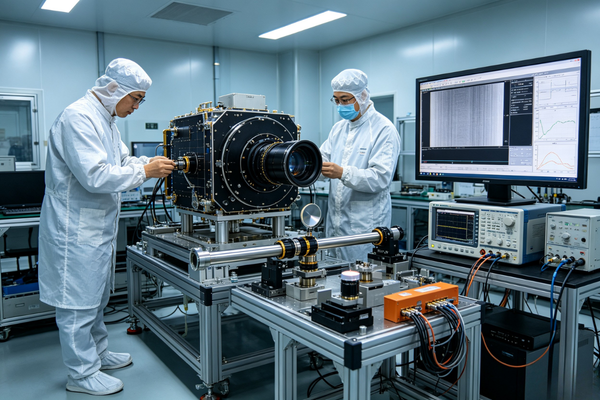
Aerospace Camera Ground Test

Vision System Hardware-in-the-Loop Simulation

Image Simulation & Algorithm Verification in Complex Scenarios

Protocol Conformance Test

Extreme Stress Test for Transmission Link

Fault Reproduction & Remote Technical Support

